> ## Documentation Index
> Fetch the complete documentation index at: https://docs.jiekou.ai/llms.txt
> Use this file to discover all available pages before exploring further.
# OpenManus
OpenManus-RL is an open-source project jointly led by Ulab-UIUC and MetaGPT. It is an extended version of OpenManus, the open-source replica of Manus. Inspired by the success of RL-tuned reasoning LLMs such as Deepseek-R1 and QwQ-32B, it aims to explore a new paradigm for RL-based LLM agent tuning. The project will regularly publish testing progress and tuned models on agent benchmarks such as GAIA and AgentBench.
To help everyone make better use of OpenManus, we have prepared a detailed tutorial covering everything from environment setup to connecting to 『Interface AI』, guiding you step by step through OpenManus!
## 1. Prerequisites
### (1) Register and get an API key
Register and log in to JieKou.AI. Enter the invitation code 【YGHNZ0】 during registration to receive a \$2 registration bonus.
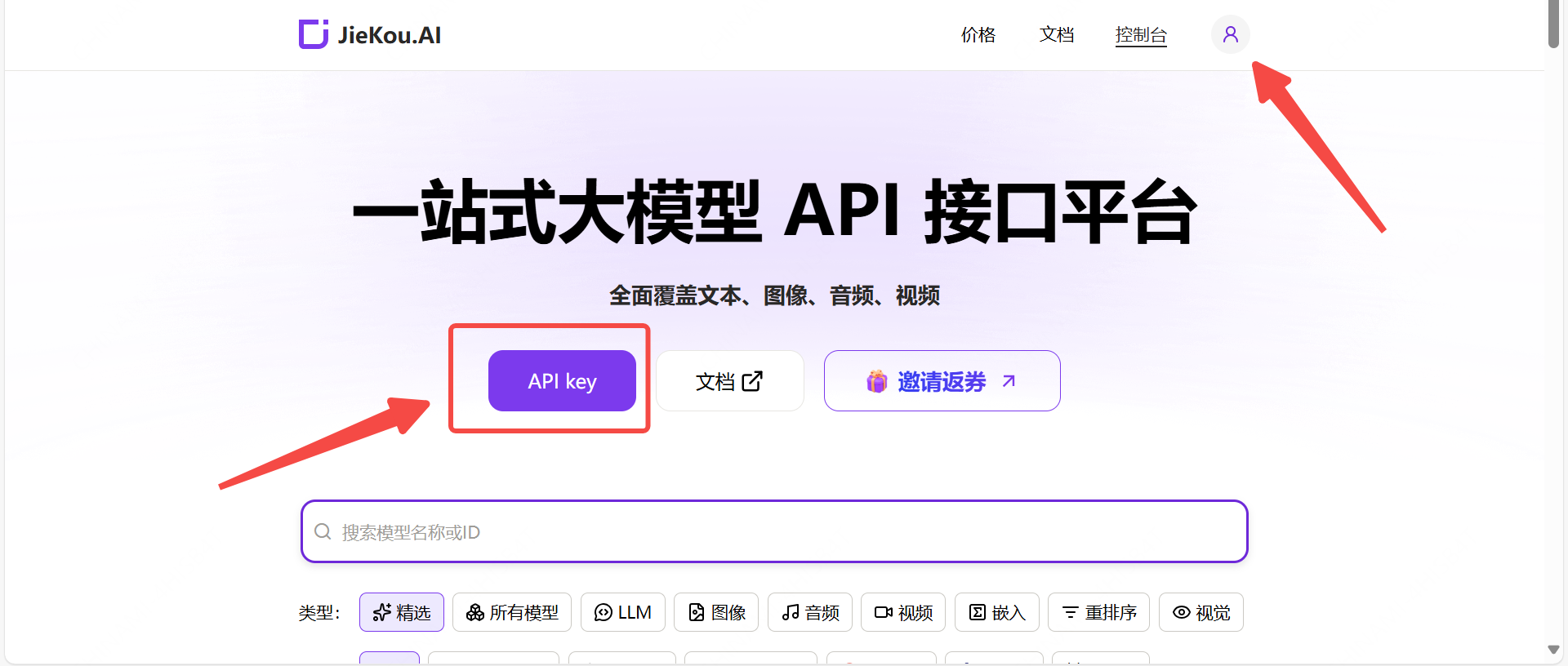
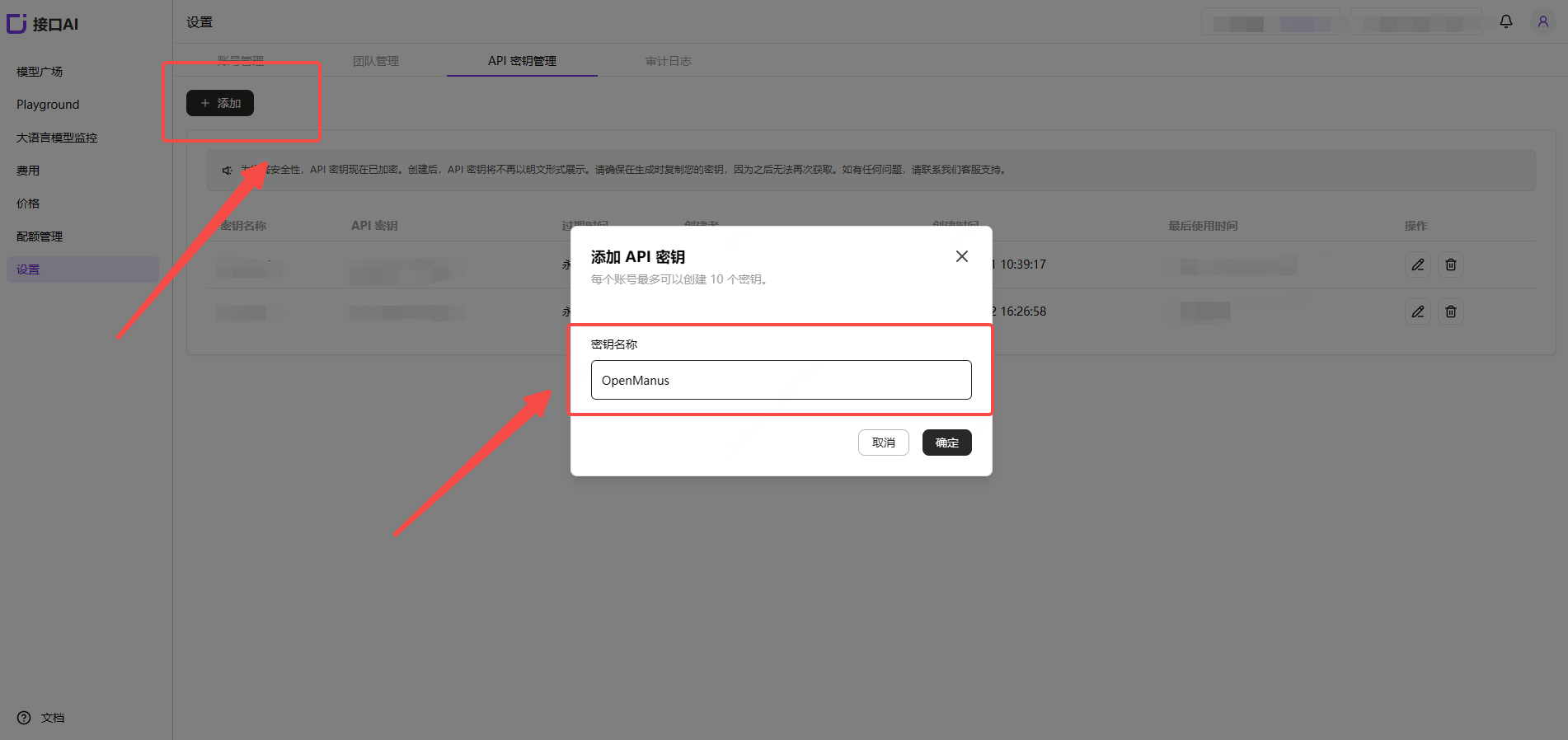
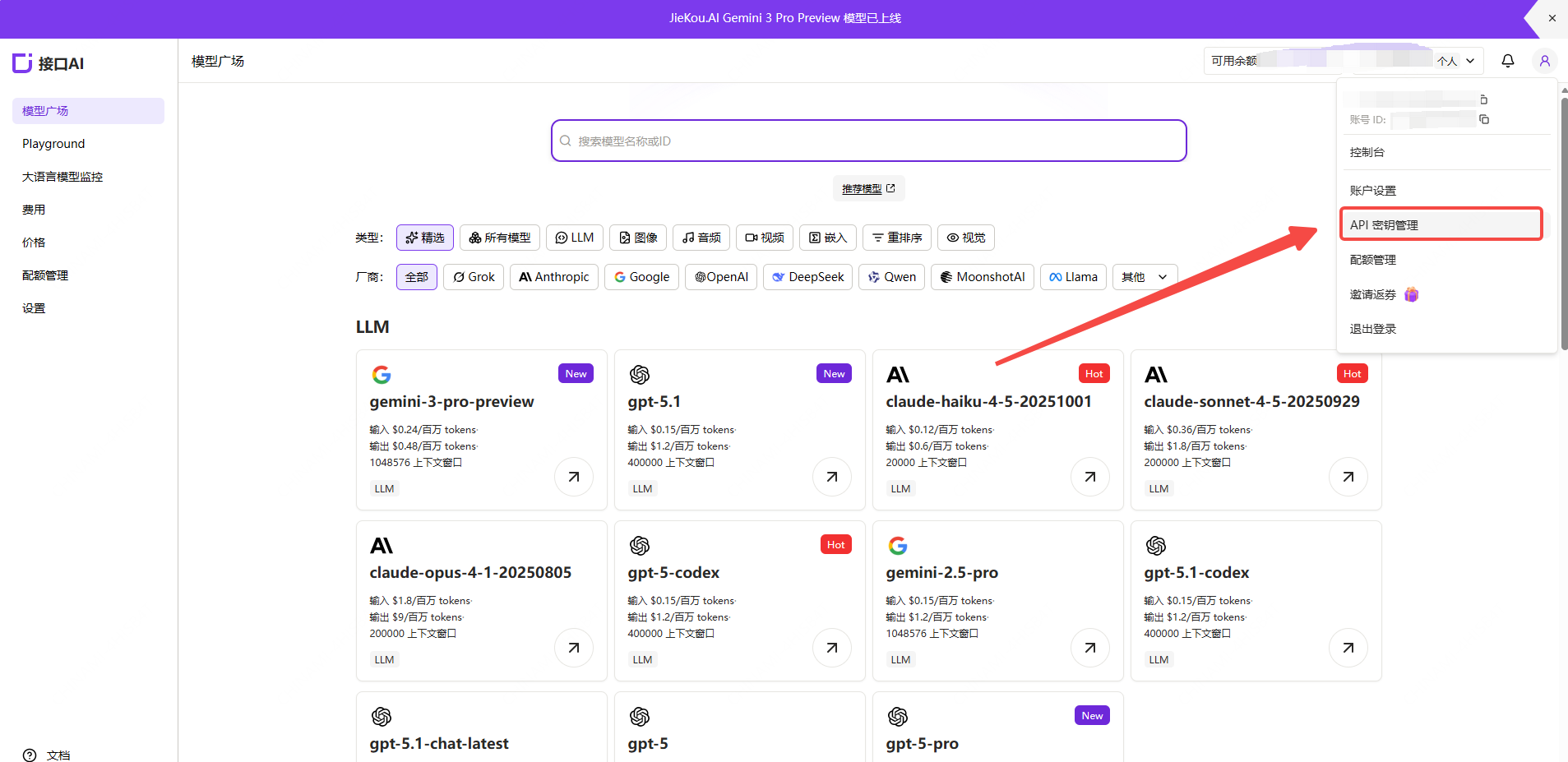 Open the 【API key】 management page, click the add button, enter a custom key name, and generate an API key.
 ### (2) Generate and save the API key
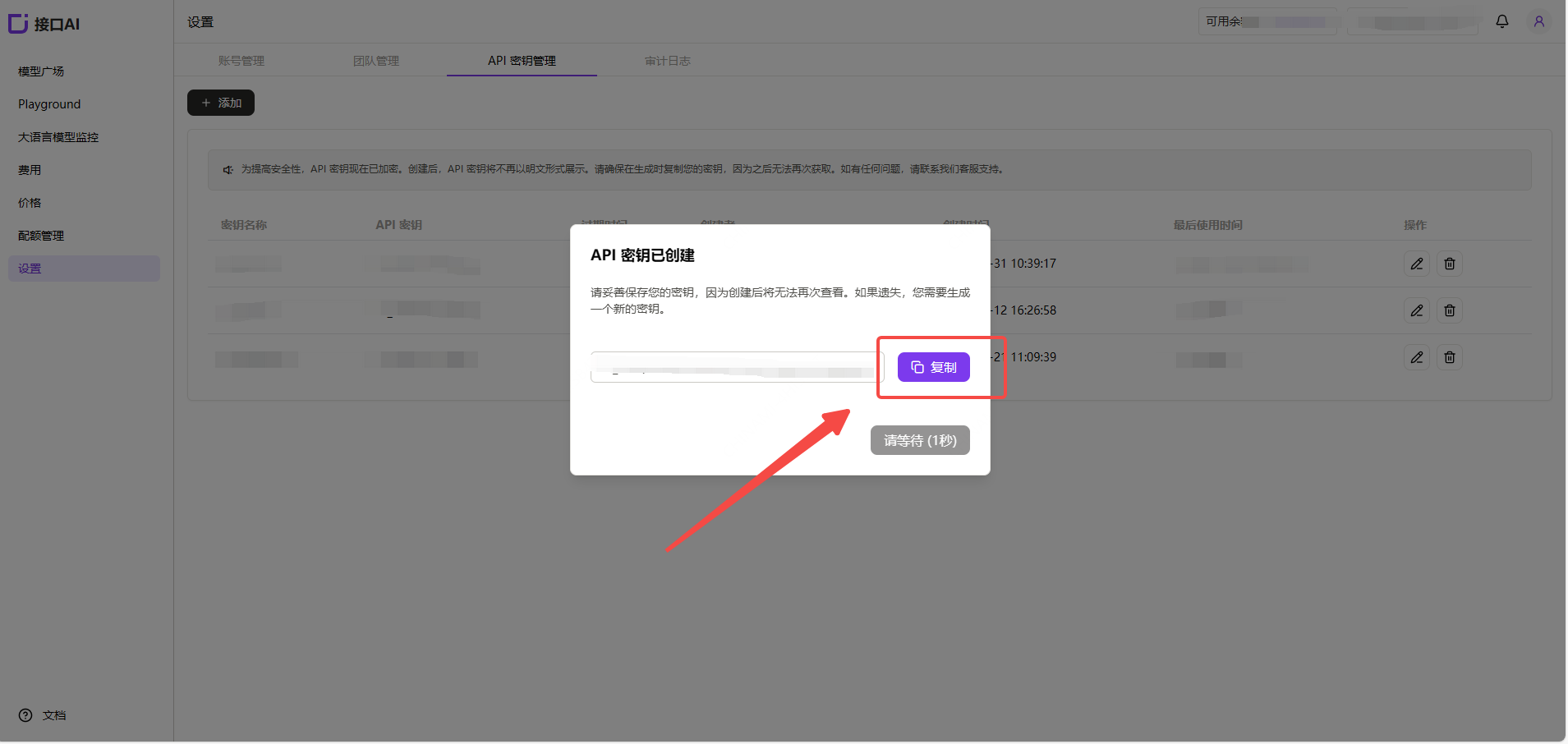
!Note: The key is encrypted and stored on the server. Once created, it cannot be viewed again, so please keep it safe. If it is lost, you will need to delete it in the console and create a new key.
### (2) Generate and save the API key
!Note: The key is encrypted and stored on the server. Once created, it cannot be viewed again, so please keep it safe. If it is lost, you will need to delete it in the console and create a new key.
 ### (3) Get the model ID you want to use
Find the model you want to use in the JieKou.AI Model Marketplace, then copy the model ID and base URL.
* Gemini-3-pro-preview
* Gemini-2.5-pro
* Claude-sonnet-4-5
* Gpt-5.1
* Gpt-4o
For other model IDs, maximum context lengths, and pricing, see: [Model Marketplace](https://jiekou.ai/models-console/library?auth_res=success\&is_reg=false)
## 2. Install OpenManus
For the full installation guide, see: [Installation Guide](https://github.com/FoundationAgents/OpenManus/blob/main/README_zh.md#%E5%AE%89%E8%A3%85%E6%8C%87%E5%8D%97). The following installation tutorial uses Windows as an example and follows "Method 2" from the installation guide.
1. Install uv, a fast Python package manager:
```
curl -LsSf https://astral.sh/uv/install.sh | sh
```
2. Clone the repository:
```
git clone https://github.com/FoundationAgents/OpenManus.git
cd OpenManus
```
3. Create and activate a virtual environment:
```
uv venv --python 3.12
source .venv/bin/activate # Unix/macOS systems
For Windows systems:
.venv\Scripts\activate
```
4. Install dependencies:
```
uv pip install -r requirements.txt
```
## 3. Configure OpenManus
OpenManus needs to be configured with the LLM API you want to use. Follow these steps:
1. Create a `config.toml` file in the `config` directory. You can copy it from the example:
```
cp config/config.example.toml config/config.toml
```
2. Edit `config/config.toml`, change 【model】, 【base\_url】, and 【api\_key】, then add your API key and custom settings:
```
# Global LLM configuration
[llm]
model = "gpt-4o"# To change the model, copy the model name from the official Interface AI website here
base_url = "https://api.highwayapi.ai/openai"
api_key = "Paste the API Key from the official Interface AI website here" # Change this
max_tokens = 4096
temperature = 0.0
# Optional configuration for a specific LLM model
[llm.vision]
model = "gpt-4o"# To change the model, copy the model name from the official Interface AI website here
base_url = "https://api.highwayapi.ai/openai"
api_key ="Paste the API Key from the official Interface AI website here" # Change this
```
## 4. Quick start OpenManus
Run OpenManus with a single command:
```
python main.py
```
Then enter your idea after `enter your prompt`!
### (3) Get the model ID you want to use
Find the model you want to use in the JieKou.AI Model Marketplace, then copy the model ID and base URL.
* Gemini-3-pro-preview
* Gemini-2.5-pro
* Claude-sonnet-4-5
* Gpt-5.1
* Gpt-4o
For other model IDs, maximum context lengths, and pricing, see: [Model Marketplace](https://jiekou.ai/models-console/library?auth_res=success\&is_reg=false)
## 2. Install OpenManus
For the full installation guide, see: [Installation Guide](https://github.com/FoundationAgents/OpenManus/blob/main/README_zh.md#%E5%AE%89%E8%A3%85%E6%8C%87%E5%8D%97). The following installation tutorial uses Windows as an example and follows "Method 2" from the installation guide.
1. Install uv, a fast Python package manager:
```
curl -LsSf https://astral.sh/uv/install.sh | sh
```
2. Clone the repository:
```
git clone https://github.com/FoundationAgents/OpenManus.git
cd OpenManus
```
3. Create and activate a virtual environment:
```
uv venv --python 3.12
source .venv/bin/activate # Unix/macOS systems
For Windows systems:
.venv\Scripts\activate
```
4. Install dependencies:
```
uv pip install -r requirements.txt
```
## 3. Configure OpenManus
OpenManus needs to be configured with the LLM API you want to use. Follow these steps:
1. Create a `config.toml` file in the `config` directory. You can copy it from the example:
```
cp config/config.example.toml config/config.toml
```
2. Edit `config/config.toml`, change 【model】, 【base\_url】, and 【api\_key】, then add your API key and custom settings:
```
# Global LLM configuration
[llm]
model = "gpt-4o"# To change the model, copy the model name from the official Interface AI website here
base_url = "https://api.highwayapi.ai/openai"
api_key = "Paste the API Key from the official Interface AI website here" # Change this
max_tokens = 4096
temperature = 0.0
# Optional configuration for a specific LLM model
[llm.vision]
model = "gpt-4o"# To change the model, copy the model name from the official Interface AI website here
base_url = "https://api.highwayapi.ai/openai"
api_key ="Paste the API Key from the official Interface AI website here" # Change this
```
## 4. Quick start OpenManus
Run OpenManus with a single command:
```
python main.py
```
Then enter your idea after `enter your prompt`!