Qoder is an agentic coding platform launched by Alibaba, aiming to advance from “AI-assisted coding” to “handing tasks over to Agents for autonomous completion”. After users describe their goals in natural language, the Agent breaks down tasks on its own, searches the codebase, calls tools, executes modifications, and verifies results, with the execution trajectory displayed throughout via a To-do list and Action Flow.Qoder comes with built-in deep codebase understanding, long-term memory, and Repo Wiki, maintaining contextual accuracy in large projects. It is available as a standalone IDE, JetBrains plugin, terminal CLI, desktop app, and Cloud Agents API, supporting multi-Agent collaboration, Skills, MCP, and custom rules.Official website: https://qoder.com/With the API services provided by Interface AI, you can call the world’s leading large models in Qoder and seamlessly integrate them into your Qoder workflow.
Log in to the official website jiekou.ai and register.
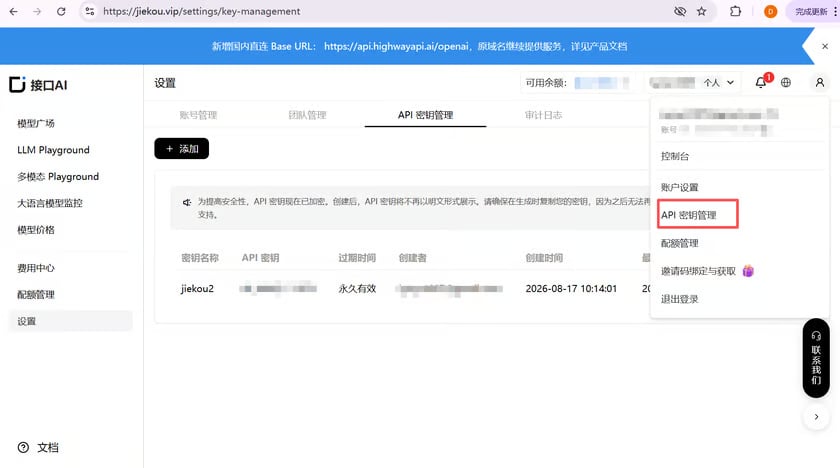
Enter the admin console, click “My” in the upper right corner, and select “API Key Management” from the dropdown list.
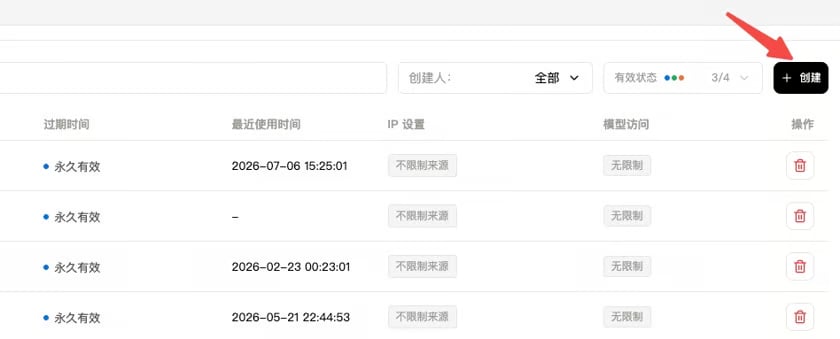
Click “Create” and enter a key name. It is recommended to use an easily recognizable name so you can distinguish keys for different purposes later in the console.
Click to copy and record the generated Key. It cannot be viewed again in the console, so please keep it safe for future use.
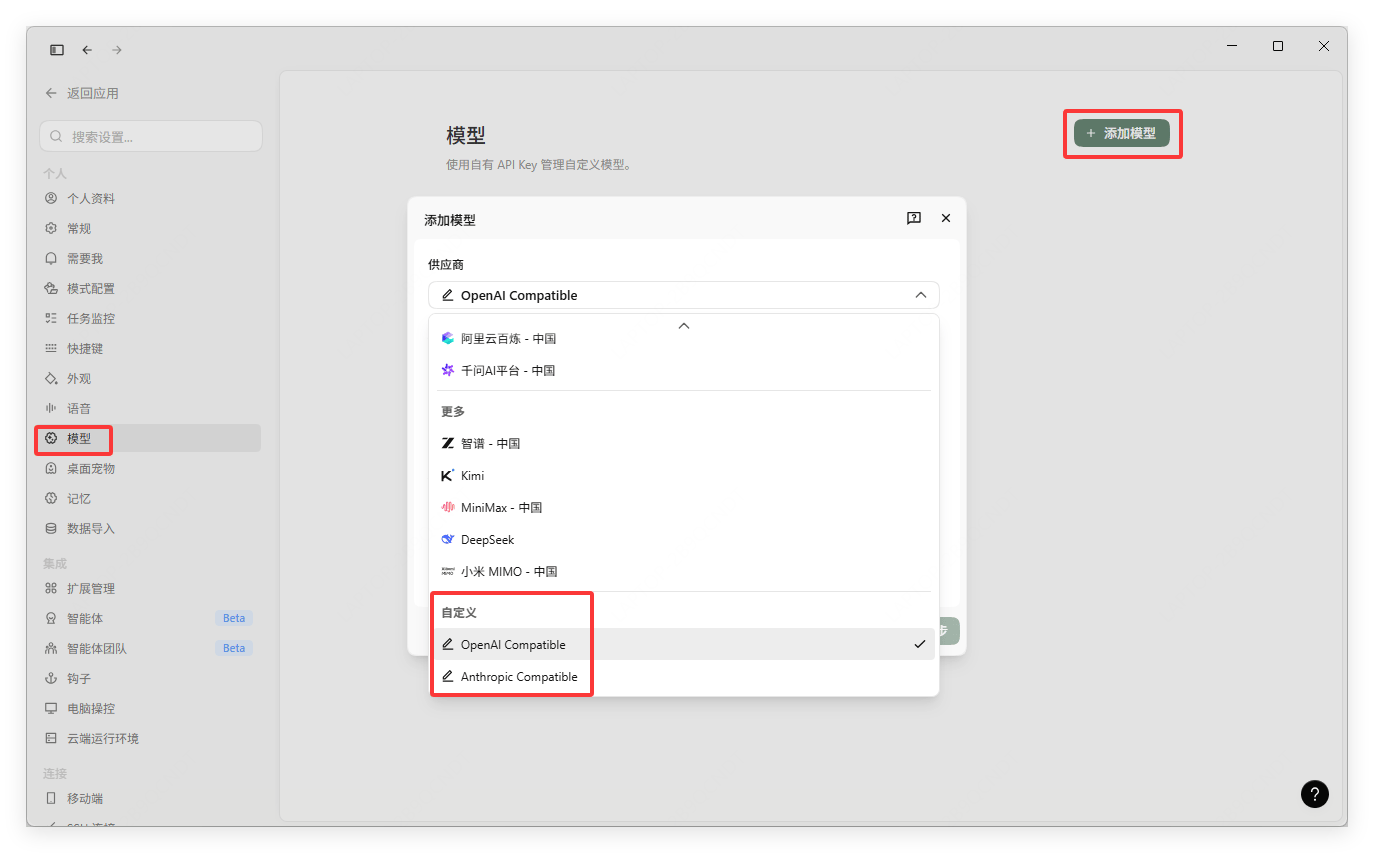
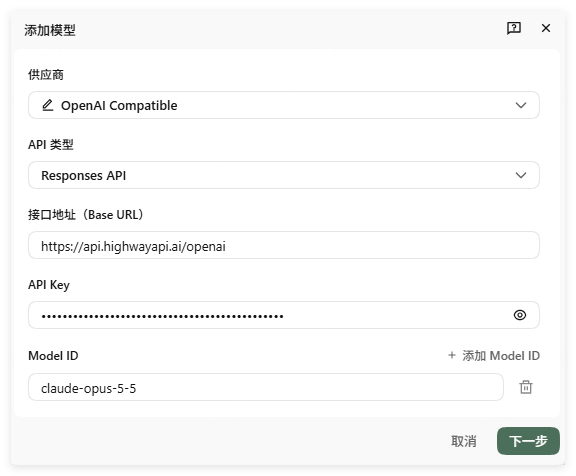
Find “Models” in Qoder settings, click “Add Model”, and select the corresponding custom API protocol based on the model you want to call
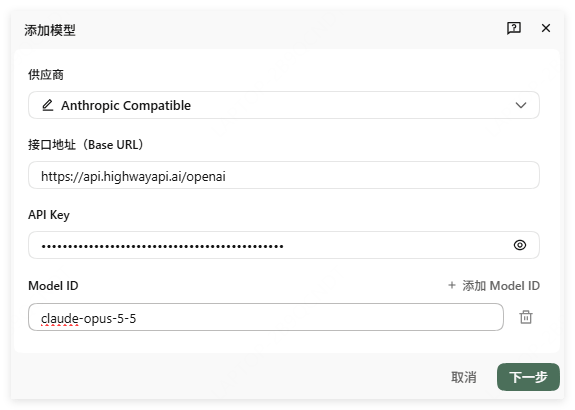
Enter the API Key you just copied, and fill in the URL. If you selected Anthropic Compatible, there is no need to select an API type (it defaults to /anthropic). If you selected OpenAI Compatible, you need to select the API type.
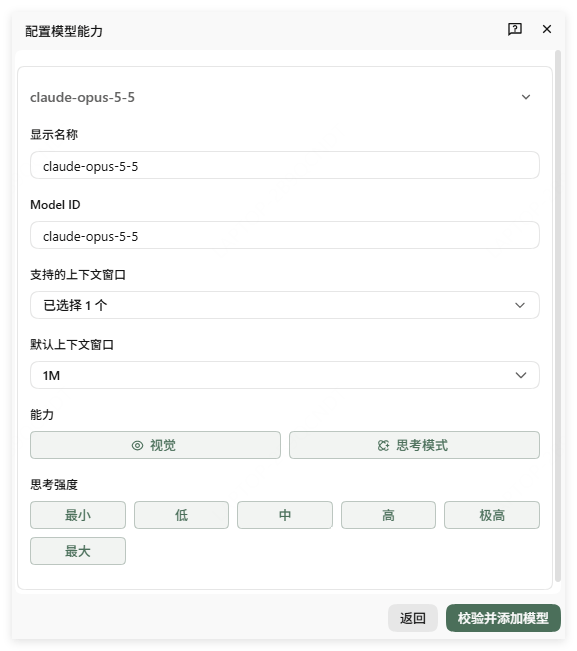
Configure model capabilities according to the model’s attributes; specific capabilities can be found in the corresponding model introduction on Interface AI
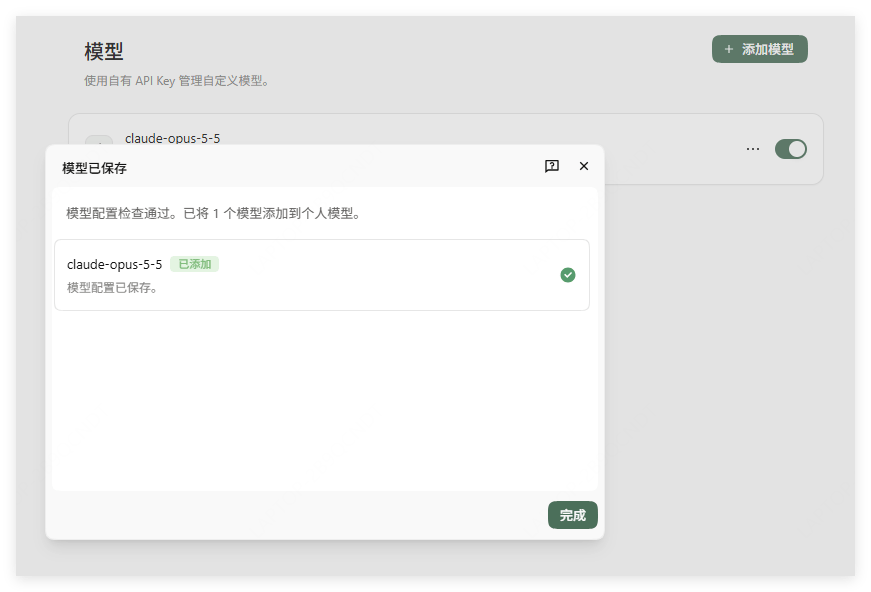
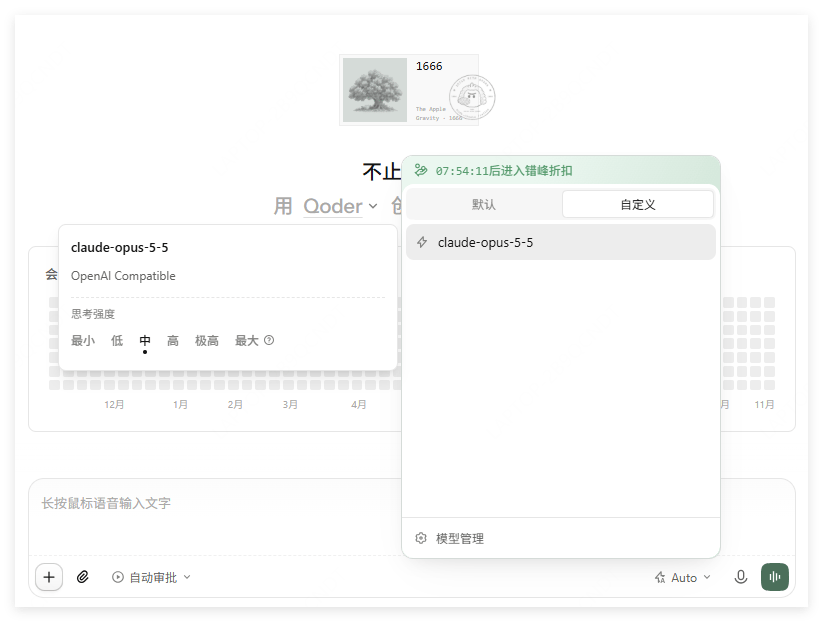
If the prompt shown in the image appears, the configuration is successful. You can find and call Interface AI’s model API services in the custom model list within the conversation.
Last modified on November 5, 2026
{"docsConfig":{"theme":"aspen","$schema":"https://mintlify.com/docs.json","name":"JieKou AI Docs","description":"接口AI 开发者文档:大语言模型与图像、视频、音频等多模态模型 API 的接入、调用与计费说明。","colors":{"primary":"#000000","light":"#0071E3","dark":"#0071E3"},"logo":{"light":"https://mintcdn.com/jiekou/Mf1wGBLqNABiRgF8/logo/light.svg?fit=max\u0026auto=format\u0026n=Mf1wGBLqNABiRgF8\u0026q=85\u0026s=81df34bfa762625ad3a4e18f59a81a0e","dark":"https://mintcdn.com/jiekou/Mf1wGBLqNABiRgF8/logo/dark.svg?fit=max\u0026auto=format\u0026n=Mf1wGBLqNABiRgF8\u0026q=85\u0026s=b81968885d04f4c09c4058bad9c364e1","href":"https://jiekou.vip"},"favicon":"https://mintcdn.com/jiekou/M__ek7klV-HYX16k/favicon.ico?fit=max\u0026auto=format\u0026n=M__ek7klV-HYX16k\u0026q=85\u0026s=7fb1bfe34418ab40c7c6025450bf40e0","navbar":{"links":[{"href":"https://jiekou.vip/models-console/library","label":"控制台"}],"primary":{"type":"button","label":"官网首页","href":"https://jiekou.vip"}},"seo":{"metatags":{"og:site_name":"接口AI 文档中心","application-name":"接口AI 文档中心","apple-mobile-web-app-title":"接口AI 文档中心"},"organization":{"name":"接口AI","url":"https://jiekou.ai"},"indexing":"all"},"contextual":{"options":["copy","view","chatgpt","claude","perplexity","mcp","add-mcp","cursor","vscode"],"display":"header"},"metadata":{"timestamp":true},"markdown":{"instructions":["JieKou AI model APIs are OpenAI-compatible. Base URL for users in mainland China (direct, no VPN): https://api.highwayapi.ai/openai; elsewhere: https://api.jiekou.ai/openai. Anthropic-compatible base URL: https://api.highwayapi.ai/anthropic or https://api.jiekou.ai/anthropic.","Authenticate with `Authorization: Bearer \u003cAPI_KEY>`; with Anthropic SDKs or Claude Code, pass the same key as `ANTHROPIC_AUTH_TOKEN`. Users create keys at https://jiekou.ai/settings/key-management. Never print or hardcode a real key.","Get current model IDs from GET https://api.jiekou.ai/openai/v1/models instead of reusing model names from memory."]},"styling":{"latex":true},"navigation":{"languages":[{"language":"zh","default":true,"href":"docs/home"},{"language":"en","href":"en/docs/home"},{"language":"es","href":"es/docs/home"},{"language":"pt-BR","href":"pt/docs/home"},{"language":"fr","href":"fr/docs/home"},{"language":"de","href":"de/docs/home"},{"language":"ja","href":"ja/docs/home"},{"language":"ru","href":"ru/docs/home"}]}},"deployment":{"deploymentMetadataValue":{"subdomain":"jiekou","hasAudioNarration":false,"actualSubdomain":"jiekou","customDomains":["docs.jiekou.ai"],"gitSource":{"type":"github","owner":"jiekouai","repo":"jiekou-docs","deployBranch":"main","contentDirectory":"","isPrivate":true,"mountPath":"","label":""},"chroma":{"liveDeploymentHistoryId":"6aec4d31dd9d9f5b04d731dc","collectionId":"43f0ff20-5cf6-4ba4-85f4-be81fd3b9627","schemaVersion":"v3","latestBuiltDeploymentHistoryId":"6aec4d31dd9d9f5b04d731dc"},"entitlements":{},"buildId":"6aec4d31dd9d9f5b04d731dc","clientVersion":"0.0.4067","searchFilterCounts":[{"language":"de","tag":"Leitfaden für Modelldienste","count":35},{"language":"zh","tag":"模型服务用户指南","count":35},{"language":"en","tag":"Model Service Guide","count":35},{"language":"es","tag":"Guía del servicio de modelos","count":35},{"language":"fr","tag":"Guide du service de modèles","count":35},{"language":"ja","tag":"モデルサービスガイド","count":35},{"language":"pt-BR","tag":"Guia do serviço de modelos","count":35},{"language":"ru","tag":"Руководство по сервису моделей","count":35},{"language":"de","tag":"Einrichtung von Drittanbieter-Tools","count":22},{"language":"zh","tag":"第三方工具配置","count":22},{"language":"zh","tag":"模型服务 API 手册","count":22},{"language":"en","tag":"Third-party Tool Setup","count":22},{"language":"en","tag":"Model Service API Reference","count":22},{"language":"es","tag":"Configuración de herramientas de terceros","count":22},{"language":"fr","tag":"Configuration des outils tiers","count":22},{"language":"ja","tag":"サードパーティツール設定","count":22},{"language":"pt-BR","tag":"Configuração de ferramentas de terceiros","count":22},{"language":"ru","tag":"Настройка сторонних инструментов","count":22},{"language":"de","tag":"API-Referenz für Modelldienste","count":19},{"language":"es","tag":"Referencia de API del servicio de modelos","count":19},{"language":"fr","tag":"Référence API du service de modèles","count":19},{"language":"ja","tag":"モデルサービス API リファレンス","count":19},{"language":"pt-BR","tag":"Referência da API do serviço de modelos","count":19},{"language":"ru","tag":"Справочник API сервиса моделей","count":19},{"language":"zh","tag":"账号用户指南","count":16},{"language":"en","tag":"Account Guide","count":16},{"language":"de","tag":"Kontoleitfaden","count":14},{"language":"es","tag":"Guía de cuenta","count":14},{"language":"fr","tag":"Guide du compte","count":14},{"language":"ja","tag":"アカウントガイド","count":14},{"language":"pt-BR","tag":"Guia da conta","count":14},{"language":"ru","tag":"Руководство по аккаунту","count":14},{"language":"de","tag":"LLM API","count":9},{"language":"zh","tag":"大语言模型 API","count":9},{"language":"en","tag":"LLM API","count":9},{"language":"es","tag":"API de LLM","count":9},{"language":"fr","tag":"API LLM","count":9},{"language":"ja","tag":"LLM API","count":9},{"language":"pt-BR","tag":"API de LLM","count":9},{"language":"ru","tag":"API больших языковых моделей","count":9},{"language":"zh","tag":"账号管理","count":8},{"language":"en","tag":"Account Management","count":8},{"language":"de","tag":"FAQ","count":7},{"language":"zh","tag":"常见问题","count":7},{"language":"en","tag":"FAQ","count":7},{"language":"es","tag":"Preguntas frecuentes","count":7},{"language":"fr","tag":"FAQ","count":7},{"language":"ja","tag":"FAQ","count":7},{"language":"pt-BR","tag":"Perguntas frequentes","count":7},{"language":"ru","tag":"Часто задаваемые вопросы","count":7},{"language":"de","tag":"Große Sprachmodelle","count":6},{"language":"de","tag":"Kontoverwaltung","count":6},{"language":"zh","tag":"大语言","count":6},{"language":"en","tag":"Large Language Models","count":6},{"language":"es","tag":"Modelos de lenguaje","count":6},{"language":"es","tag":"Gestión de cuenta","count":6},{"language":"fr","tag":"Grands modèles de langage","count":6},{"language":"fr","tag":"Gestion du compte","count":6},{"language":"ja","tag":"大規模言語モデル","count":6},{"language":"ja","tag":"アカウント管理","count":6},{"language":"pt-BR","tag":"Modelos de linguagem","count":6},{"language":"pt-BR","tag":"Gerenciamento da conta","count":6},{"language":"ru","tag":"Большие языковые модели","count":6},{"language":"ru","tag":"Управление аккаунтом","count":6},{"language":"de","tag":"Bilder","count":5},{"language":"zh","tag":"图像","count":5},{"language":"en","tag":"Images","count":5},{"language":"es","tag":"Imágenes","count":5},{"language":"fr","tag":"Images","count":5},{"language":"ja","tag":"画像","count":5},{"language":"pt-BR","tag":"Imagens","count":5},{"language":"ru","tag":"Изображения","count":5},{"language":"de","tag":"API-Grundlagen","count":4},{"language":"zh","tag":"API 基础","count":4},{"language":"en","tag":"API Basics","count":4},{"language":"es","tag":"Conceptos básicos de API","count":4},{"language":"fr","tag":"Bases de l'API","count":4},{"language":"ja","tag":"API の基本","count":4},{"language":"pt-BR","tag":"Noções básicas da API","count":4},{"language":"ru","tag":"Основы API","count":4}]},"assistantConfig":{},"basePath":"","hasChatPermissions":false,"hasWebMcpPermissions":false,"toggles":[{"name":"kill-isr","enabled":true,"variant":{"name":"disabled","enabled":false,"feature_enabled":true},"impressionData":false},{"name":"agent-mintlify-slack","enabled":true,"variant":{"name":"disabled","enabled":false,"feature_enabled":true},"impressionData":false},{"name":"agent-integrations-settings","enabled":true,"variant":{"name":"disabled","enabled":false,"feature_enabled":true},"impressionData":false},{"name":"rbac-expansion","enabled":true,"variant":{"name":"disabled","enabled":false,"feature_enabled":true},"impressionData":false},{"name":"automations-pr-grouping","enabled":true,"variant":{"name":"disabled","enabled":false,"feature_enabled":true},"impressionData":false},{"name":"custom-prefix","enabled":true,"variant":{"name":"disabled","enabled":false,"feature_enabled":true},"impressionData":false},{"name":"analytics-v7","enabled":true,"variant":{"name":"disabled","enabled":false,"feature_enabled":true},"impressionData":false},{"name":"user-flows-analytics","enabled":true,"variant":{"name":"disabled","enabled":false,"feature_enabled":true},"impressionData":false},{"name":"no-publish-flow","enabled":true,"variant":{"name":"disabled","enabled":false,"feature_enabled":true},"impressionData":false},{"name":"workos-onboarding","enabled":true,"variant":{"name":"disabled","enabled":false,"feature_enabled":true},"impressionData":false},{"name":"llms-txt-v2","enabled":true,"variant":{"name":"disabled","enabled":false,"feature_enabled":true},"impressionData":false},{"name":"snapshot-serving-live","enabled":true,"variant":{"name":"disabled","enabled":false,"feature_enabled":true},"impressionData":false},{"name":"stripTemperatureMiddleware","enabled":true,"variant":{"name":"disabled","enabled":false,"feature_enabled":true},"impressionData":false},{"name":"support-platform-pylon-zendesk","enabled":true,"variant":{"name":"disabled","enabled":false,"feature_enabled":true},"impressionData":false},{"name":"snapshot-serving","enabled":true,"variant":{"name":"disabled","enabled":false,"feature_enabled":true},"impressionData":false},{"name":"instant-rollback","enabled":true,"variant":{"name":"disabled","enabled":false,"feature_enabled":true},"impressionData":false},{"name":"granular-notifications-server","enabled":true,"variant":{"name":"disabled","enabled":false,"feature_enabled":true},"impressionData":false},{"name":"granular-notifications","enabled":true,"variant":{"name":"disabled","enabled":false,"feature_enabled":true},"impressionData":false},{"name":"automations-fable","enabled":true,"variant":{"name":"disabled","enabled":false,"feature_enabled":true},"impressionData":false},{"name":"fixed-ai-action-pricing","enabled":true,"variant":{"name":"disabled","enabled":false,"feature_enabled":true},"impressionData":false},{"name":"automation-resolve-merge-conflict","enabled":true,"variant":{"name":"disabled","enabled":false,"feature_enabled":true},"impressionData":false},{"name":"scoped-publishing","enabled":true,"variant":{"name":"disabled","enabled":false,"feature_enabled":true},"impressionData":false},{"name":"mintql","enabled":true,"variant":{"name":"disabled","enabled":false,"feature_enabled":true},"impressionData":false},{"name":"page-level-analytics","enabled":true,"variant":{"name":"disabled","enabled":false,"feature_enabled":true},"impressionData":false},{"name":"editor-version-history-v2","enabled":true,"variant":{"name":"disabled","enabled":false,"feature_enabled":true},"impressionData":false},{"name":"billing-page-v2","enabled":true,"variant":{"name":"disabled","enabled":false,"feature_enabled":true},"impressionData":false},{"name":"full-page-search","enabled":true,"variant":{"name":"disabled","enabled":false,"feature_enabled":true},"impressionData":false},{"name":"workspace-projects","enabled":true,"variant":{"name":"disabled","enabled":false,"feature_enabled":true},"impressionData":false},{"name":"assistant-v5","enabled":true,"variant":{"name":"disabled","enabled":false,"feature_enabled":true},"impressionData":false},{"name":"fork-pr-previews","enabled":true,"variant":{"name":"disabled","enabled":false,"feature_enabled":true},"impressionData":false},{"name":"revalidation-jwt","enabled":true,"variant":{"name":"disabled","enabled":false,"feature_enabled":true},"impressionData":false},{"name":"vite-origin","enabled":true,"variant":{"name":"disabled","enabled":false,"feature_enabled":true},"impressionData":false},{"name":"workos-sso-scim","enabled":true,"variant":{"name":"disabled","enabled":false,"feature_enabled":true},"impressionData":false},{"name":"hobby-abuse-scan","enabled":true,"variant":{"name":"disabled","enabled":false,"feature_enabled":true},"impressionData":false},{"name":"dashboard-inbox","enabled":true,"variant":{"name":"disabled","enabled":false,"feature_enabled":true},"impressionData":false},{"name":"workos-signup","enabled":true,"variant":{"name":"disabled","enabled":false,"feature_enabled":true},"impressionData":false},{"name":"turbopuffer-dual-write","enabled":true,"variant":{"name":"disabled","enabled":false,"feature_enabled":true},"impressionData":false},{"name":"workos-enabled","enabled":true,"variant":{"name":"disabled","enabled":false,"feature_enabled":true},"impressionData":false},{"name":"approve-review-flow","enabled":true,"variant":{"name":"disabled","enabled":false,"feature_enabled":true},"impressionData":false},{"name":"sso-setup-deadline-banner","enabled":true,"variant":{"name":"disabled","enabled":false,"feature_enabled":true},"impressionData":false},{"name":"turbopuffer-serve","enabled":true,"variant":{"name":"disabled","enabled":false,"feature_enabled":true},"impressionData":false},{"name":"live-agents","enabled":true,"variant":{"name":"disabled","enabled":false,"feature_enabled":true},"impressionData":false}],"googleFontsInlined":false},"customCss":[{"filePath":"global.css","content":"*[style*=\"rgb(124, 58, 237)\"],*[style*=\"#7c3aed\"],*[style*=\"7c3aed\"]{background-color:#F5F5F5!important;background:#F5F5F5!important}#navbar .nav-tabs-item[data-active=\"true\"],#navbar .nav-tabs-item[aria-current=\"location\"]{background-color:transparent!important;background:transparent!important}#sidebar *[class*=\"active\"],#sidebar *[aria-selected=\"true\"],#sidebar *[data-active=\"true\"]{background-color:#F5F5F5!important}#sidebar button.bg-\\\\[var\\\\(--primary\\\\) \\\\],\n#sidebar a.bg-\\\\[var\\\\(--primary\\\\) \\\\]{background-color:#F5F5F5!important}.table-container{overflow-x:scroll;box-shadow:3px 0 10px 0 rgba(25, 85, 140, .05)}.table-container table{margin-top:0}.table thead{background-color:#eef2f150}.table thead th{padding:8px 10px;text-align:left;white-space:nowrap}.table tbody td{padding:6px 10px}.table-big thead th{padding:12px 10px}.table-big tbody td{padding:10px 10px}.table .list-col{position:relative;padding-left:31px;margin:0;text-align:left}.table .list-col::before{content:\"•\";position:absolute;left:18px;top:6px;color:#16b063b0}.table .list-sub-col{position:relative;padding-left:46px;margin:0;text-align:left}.table .list-sub-col::before{content:\"\";position:absolute;left:36px;top:15px;width:4px;height:4px;background-color:#16b06380}.table .list-grandson-col{position:relative;padding-left:60px;margin:0;text-align:left}.table .list-grandson-col::before{content:\"\";position:absolute;left:50px;top:15px;width:4px;height:4px;border-radius:100%;border:1px solid #16b06380}.table .list-grandson-sub-col{position:relative;padding-left:66px;margin:0;text-align:left}.table .list-grandson-sub-col::before{content:\"\";position:absolute;left:58px;top:16px;width:3px;height:3px;border-radius:100%;border:1px solid #16b06350}.table .type-desc{display:inline-block;margin-left:12px;color:#9e9c98b0}.table .type-desc-narrow{margin-left:4px}.table .delete{text-decoration:line-through}.table .deprecated{display:inline-block;color:#f23030;margin-bottom:4px}.table .new-field{display:inline-block;margin-bottom:4px;color:#22ad5c}.table .moved{display:inline-block;margin-bottom:4px;color:#f27430}.table .inline-block{display:inline-block}.table .mt-1{margin-top:4px}.table .mt-2{margin-top:8px}.table .ml-0{margin-left:0}.model-id-item{padding:.125rem .5rem;color:#111827;font-size:.875em;font-weight:500;font-variant-ligatures:none;overflow-wrap:break-word;border-radius:var(--rounded-md, .375rem);background-color:rgb(var(--gray-100) / .5)}.param_text{font-size:14px}.param_frame{width:100%;padding:0 8px}.unified-api-container span[data-as=p]{display:block;margin-top:1.25em;margin-bottom:1.25em}.unified-api-inline-label{padding:2px 8px;border-radius:6px;background-color:#F1EFF580;color:#111827;font-size:12px;font-family:var(--font-jetbrains-mono), ui-monospace, SFMono-Regular, Menlo, Monaco, Consolas, \"Liberation Mono\", \"Courier New\", monospace}.unified-api-selector-container{margin-bottom:16px}.unified-api-description{padding:6px 8px;font-size:15px;color:#4f4e4a;border-radius:6px;border-left:4px solid #fafafa;background-color:#fdfdfd}.unified-api-selector-label{display:block;margin-top:36px;margin-bottom:12px;font-size:15px;font-weight:500;color:#374151;line-height:1.25}.unified-api-selector-wrapper{position:relative;max-width:300px}.unified-api-selector-button{height:40px;width:100%;border-radius:6px;border:1px solid #d1d5db;background-color:#ffffff;padding:0 32px 0 12px;font-size:14px;color:#374151;outline:none;cursor:pointer;text-align:left;display:flex;align-items:center;justify-content:space-between;transition:border-color 0.2s ease-in-out, box-shadow 0.2s ease-in-out;box-shadow:0 1px 2px 0 rgba(0, 0, 0, 0.05);font-family:var(--font-jetbrains-mono), ui-monospace, SFMono-Regular, Menlo, Monaco, Consolas, \"Liberation Mono\", \"Courier New\", monospace}.unified-api-selector-button:hover{border-color:#9ca3af}.unified-api-selector-button:focus{border-color:#3b82f6;box-shadow:0 0 0 3px rgba(59, 130, 246, 0.1)}.unified-api-selector-arrow{transition:transform 0.2s ease-in-out}.unified-api-selector-arrow.open{transform:rotate(180deg)}.unified-api-selector-dropdown{position:absolute;top:100%;left:0;right:0;z-index:50;margin-top:4px;border-radius:6px;border:1px solid #d1d5db;background-color:#ffffff;box-shadow:0 10px 25px -3px rgba(0, 0, 0, 0.2), 0 4px 10px -2px rgba(0, 0, 0, 0.15);max-height:275px;overflow:hidden}.unified-api-selector-dropdown::after{content:'';position:sticky;bottom:0;left:0;right:0;height:12px;background:linear-gradient(to top, rgba(255, 255, 255, 1) 0%, rgba(255, 255, 255, 0.5) 50%, rgba(255, 255, 255, 0.3) 100%);z-index:10;pointer-events:none;display:block;margin-top:-12px}.unified-api-selector-option{padding:10px 12px;font-size:14px;color:#374151;cursor:pointer;background-color:#ffffff}.unified-api-selector-option:not(:last-child){margin-top:1px;margin-bottom:1px;border-bottom:1px solid #f5f5f5}.unified-api-selector-option.selected{background-color:#f3f4f6}.unified-api-selector-option:hover:not(.selected){background-color:#f8fafc}.dark .unified-api-selector-label{color:inherit}.dark .unified-api-search-container{background-color:#1f2937}.dark .unified-api-search-input{background-color:#1f2937;color:#e5e7eb}.dark .unified-api-selector-button{border:1px solid #4b5563;background-color:#1f2937;color:#e5e7eb;box-shadow:0 1px 2px 0 rgba(0, 0, 0, 0.3)}.dark .unified-api-selector-button:hover{border-color:#6b7280}.dark .unified-api-selector-button:focus{border-color:#3b82f6;box-shadow:0 0 0 3px rgba(59, 130, 246, 0.2)}.dark .unified-api-selector-dropdown{border:1px solid #4b5563;background-color:#1f2937;box-shadow:0 10px 25px -3px rgba(0, 0, 0, 0.4), 0 4px 10px -2px rgba(0, 0, 0, 0.3)}.dark .unified-api-selector-dropdown::after{background:linear-gradient(to top, rgba(31, 41, 55, 1) 0%, rgba(31, 41, 55, 0.5) 50%, rgba(31, 41, 55, 0.3) 100%)}.dark .unified-api-selector-option{color:#e5e7eb;background-color:#1f2937}.dark .unified-api-selector-option:not(:last-child){border-bottom:1px solid #374151}.dark .unified-api-selector-option.selected{background-color:#374151}.dark .unified-api-selector-option:hover:not(.selected){background-color:#2d3748}.dark .unified-api-description{padding:0;background-color:inherit;color:#e5e7eb;border-left:none}.unified-api-loading-container{display:flex;flex-direction:column;align-items:center;justify-content:center;padding:48px 24px;text-align:center}.unified-api-loading-spinner{width:32px;height:32px;border:3px solid #f3f4f6;border-top:3px solid #7c3aed;border-radius:50%;animation:unified-api-spin 1s linear infinite;margin-bottom:16px}.unified-api-loading-text{color:#6b7280;font-size:14px;margin:0}@keyframes unified-api-spin{0%{transform:rotate(0deg)}100%{transform:rotate(360deg)}}.unified-api-search-container{padding:8px 12px;border-bottom:1px solid #e5e7eb;background-color:#fefefe}.unified-api-search-input{width:100%;padding:8px 12px;border:1px solid #d1d5db;border-radius:4px;font-size:14px;background-color:#ffffff;color:#374151;outline:none;transition:border-color 0.2s ease}.unified-api-search-input:focus{border-color:#7c3aed;box-shadow:0 0 0 3px rgba(124, 58, 237, 0.1)}.unified-api-search-input::placeholder{color:#9ca3af}.unified-api-options-container{padding-bottom:12px;max-height:calc(275px - 48px);overflow-y:auto}.unified-api-no-results{padding:16px 12px;text-align:center;color:#6b7280;font-size:14px;font-style:italic}:root{--nv-toc-band-color: var(--primary)}.dark{--nv-toc-band-color: var(--primary-light)}html[data-nv-toc-band] #table-of-contents [data-layout-item=\"toc-item-link\"],html[data-nv-toc-band] #table-of-contents [data-layout-item=\"toc-item\"]{border-left-color:transparent}:root{--nv-toc-band-from: 30%;--nv-toc-band-to: 0%;--nv-toc-band-fade: 100%}html[data-nv-toc-band] #table-of-contents[data-look=\"default\"] [data-layout-item=\"toc-item\"][data-active]>[data-layout-item=\"toc-item-link\"]:not([data-nv-in-view]){color:rgb(var(--gray-600))}html[data-nv-toc-band] #table-of-contents[data-look=\"default\"] [data-layout-item=\"toc-item\"] [data-layout-item=\"toc-item\"][data-active]>[data-layout-item=\"toc-item-link\"]:not([data-nv-in-view]){color:rgb(var(--gray-500))}html.dark[data-nv-toc-band] #table-of-contents[data-look=\"default\"] [data-layout-item=\"toc-item\"][data-active]>[data-layout-item=\"toc-item-link\"]:not([data-nv-in-view]),html.dark[data-nv-toc-band] #table-of-contents[data-look=\"default\"] [data-layout-item=\"toc-item\"] [data-layout-item=\"toc-item\"][data-active]>[data-layout-item=\"toc-item-link\"]:not([data-nv-in-view]){color:rgb(var(--gray-400))}html[data-nv-toc-band] #table-of-contents[data-look=\"default\"] [data-layout-item=\"toc-item\"][data-active]>[data-layout-item=\"toc-item-link\"]:not([data-nv-in-view]){text-shadow:none}html[data-nv-toc-band] #table-of-contents[data-look=\"default\"] [data-layout-item=\"toc-item\"][data-active]>[data-layout-item=\"toc-item-link\"]:not([data-nv-in-view]):hover,html[data-nv-toc-band] #table-of-contents[data-look=\"default\"] [data-layout-item=\"toc-item\"] [data-layout-item=\"toc-item\"][data-active]>[data-layout-item=\"toc-item-link\"]:not([data-nv-in-view]):hover{color:rgb(var(--gray-900))}html.dark[data-nv-toc-band] #table-of-contents[data-look=\"default\"] [data-layout-item=\"toc-item\"][data-active]>[data-layout-item=\"toc-item-link\"]:not([data-nv-in-view]):hover,html.dark[data-nv-toc-band] #table-of-contents[data-look=\"default\"] [data-layout-item=\"toc-item\"] [data-layout-item=\"toc-item\"][data-active]>[data-layout-item=\"toc-item-link\"]:not([data-nv-in-view]):hover{color:rgb(var(--gray-300))}#table-of-contents [data-layout-item=\"toc-item-link\"][data-nv-in-view]{color:rgb(var(--gray-900))}.dark #table-of-contents [data-layout-item=\"toc-item-link\"][data-nv-in-view]{color:rgb(var(--gray-100))}#table-of-contents nav{position:relative;isolation:isolate}.nv-toc-band{position:absolute;inset:0;z-index:-1;pointer-events:none;background:linear-gradient(to right, rgb(var(--nv-toc-band-color) / 0.3), transparent);clip-path:inset(0 0 100% round 8px)}.nv-toc-band[data-ready]{transition:clip-path 300ms ease-out}@supports (background: linear-gradient(in oklab, red, blue)) and (color: color-mix(in oklab, red, blue)){.nv-toc-band{background:linear-gradient(\n to right in oklab,\n color-mix(in oklab, rgb(var(--nv-toc-band-color)) var(--nv-toc-band-from), transparent),\n color-mix(in oklab, rgb(var(--nv-toc-band-color)) var(--nv-toc-band-to), transparent)\n var(--nv-toc-band-fade)\n )}}@media (prefers-reduced-motion: reduce){.nv-toc-band[data-ready]{transition:none}}#content-container:has(#content[data-page-href$=\"/docs/home\"]){max-width:72rem}"}],"page":{"pagePath":"en/docs/integration/qoder","slug":"/en/docs/integration/qoder","pageMetadata":{"title":"Qoder","og:title":"Interface AI × Qoder","description":null,"href":"/en/docs/integration/qoder"},"pageType":"default","mdx":{"mdxSource":{"compiledSource":"\"use strict\";const{Fragment:_Fragment,jsx:_jsx,jsxs:_jsxs}=arguments[0];const{useMDXComponents:_provideComponents}=arguments[0];function _createMdxContent(props){const _components={a:`a`,li:`li`,ol:`ol`,p:`p`,ul:`ul`,..._provideComponents(),...props.components},{Heading,OptimizedImage}=_components;if(!Heading)_missingMdxReference(`Heading`,true);if(!OptimizedImage)_missingMdxReference(`OptimizedImage`,true);return _jsxs(_Fragment,{children:[_jsx(Heading,{level:`2`,id:`what-is-qoder`,children:`What is Qoder?`}),`\n`,_jsx(_components.p,{children:`Qoder is an agentic coding platform launched by Alibaba, aiming to advance from “AI-assisted coding” to “handing tasks over to Agents for autonomous completion”. After users describe their goals in natural language, the Agent breaks down tasks on its own, searches the codebase, calls tools, executes modifications, and verifies results, with the execution trajectory displayed throughout via a To-do list and Action Flow.`}),`\n`,_jsx(_components.p,{children:`Qoder comes with built-in deep codebase understanding, long-term memory, and Repo Wiki, maintaining contextual accuracy in large projects. It is available as a standalone IDE, JetBrains plugin, terminal CLI, desktop app, and Cloud Agents API, supporting multi-Agent collaboration, Skills, MCP, and custom rules.`}),`\n`,_jsxs(_components.p,{children:[`Official website: `,_jsx(_components.a,{href:`https://qoder.com/`,children:`https://qoder.com/`})]}),`\n`,_jsx(_components.p,{children:`With the API services provided by Interface AI, you can call the world’s leading large models in Qoder and seamlessly integrate them into your Qoder workflow.`}),`\n`,_jsx(Heading,{level:`2`,id:`how-to-connect-interface-ai-to-qoder`,children:`How to connect Interface AI to Qoder?`}),`\n`,_jsx(Heading,{level:`3`,id:`obtain-an-api-key`,children:`Obtain an API Key`}),`\n`,_jsxs(_components.ol,{children:[`\n`,_jsxs(_components.li,{children:[`\n`,_jsx(_components.p,{children:`Log in to the official website jiekou.ai and register.`}),`\n`]}),`\n`,_jsxs(_components.li,{children:[`\n`,_jsx(_components.p,{children:`Enter the admin console, click “My” in the upper right corner, and select “API Key Management” from the dropdown list.`}),`\n`,_jsx(OptimizedImage,{src:`https://mintcdn.com/jiekou/woskTYHkYOH0CRpH/images/qoder-01.png?fit=max\u0026auto=format\u0026n=woskTYHkYOH0CRpH\u0026q=85\u0026s=3287e5b2fcc2e26405eabb4830d05ef9`,alt:``,\"data-og-width\":`840`,width:`840`,\"data-og-height\":`468`,height:`468`,\"data-path\":`images/qoder-01.png`,\"data-optimize\":`true`,\"data-opv\":`3`,srcset:`https://mintcdn.com/jiekou/woskTYHkYOH0CRpH/images/qoder-01.png?w=280\u0026fit=max\u0026auto=format\u0026n=woskTYHkYOH0CRpH\u0026q=85\u0026s=ab58a3cd538ec5cf39eb05ed8c40f5a4 280w, https://mintcdn.com/jiekou/woskTYHkYOH0CRpH/images/qoder-01.png?w=560\u0026fit=max\u0026auto=format\u0026n=woskTYHkYOH0CRpH\u0026q=85\u0026s=dac221dd3aee5039bde7f61c201749f9 560w, https://mintcdn.com/jiekou/woskTYHkYOH0CRpH/images/qoder-01.png?w=840\u0026fit=max\u0026auto=format\u0026n=woskTYHkYOH0CRpH\u0026q=85\u0026s=d12a77d3107b676771bf1b947c63c7c2 840w, https://mintcdn.com/jiekou/woskTYHkYOH0CRpH/images/qoder-01.png?w=1100\u0026fit=max\u0026auto=format\u0026n=woskTYHkYOH0CRpH\u0026q=85\u0026s=f86ed7b55e06f5264b590510a0ac2324 1100w, https://mintcdn.com/jiekou/woskTYHkYOH0CRpH/images/qoder-01.png?w=1650\u0026fit=max\u0026auto=format\u0026n=woskTYHkYOH0CRpH\u0026q=85\u0026s=58f6c7abe3614465ed6f0f02b3272c9d 1650w, https://mintcdn.com/jiekou/woskTYHkYOH0CRpH/images/qoder-01.png?w=2500\u0026fit=max\u0026auto=format\u0026n=woskTYHkYOH0CRpH\u0026q=85\u0026s=1ba4036a7d7b839efe6a87774ed0147c 2500w`}),`\n`]}),`\n`,_jsxs(_components.li,{children:[`\n`,_jsx(_components.p,{children:`Click “Create” and enter a key name. It is recommended to use an easily recognizable name so you can distinguish keys for different purposes later in the console.`}),`\n`,_jsx(OptimizedImage,{src:`https://mintcdn.com/jiekou/woskTYHkYOH0CRpH/images/qoder-02.png?fit=max\u0026auto=format\u0026n=woskTYHkYOH0CRpH\u0026q=85\u0026s=dca61fd79be74676713965a7eae40fa1`,alt:``,\"data-og-width\":`840`,width:`840`,\"data-og-height\":`339`,height:`339`,\"data-path\":`images/qoder-02.png`,\"data-optimize\":`true`,\"data-opv\":`3`,srcset:`https://mintcdn.com/jiekou/woskTYHkYOH0CRpH/images/qoder-02.png?w=280\u0026fit=max\u0026auto=format\u0026n=woskTYHkYOH0CRpH\u0026q=85\u0026s=a5b6496820fedecac20bff333892b1d8 280w, https://mintcdn.com/jiekou/woskTYHkYOH0CRpH/images/qoder-02.png?w=560\u0026fit=max\u0026auto=format\u0026n=woskTYHkYOH0CRpH\u0026q=85\u0026s=e484d44f18d4bca30352c338d9388b8a 560w, https://mintcdn.com/jiekou/woskTYHkYOH0CRpH/images/qoder-02.png?w=840\u0026fit=max\u0026auto=format\u0026n=woskTYHkYOH0CRpH\u0026q=85\u0026s=600d31ec720aa552cf097b334425bffd 840w, https://mintcdn.com/jiekou/woskTYHkYOH0CRpH/images/qoder-02.png?w=1100\u0026fit=max\u0026auto=format\u0026n=woskTYHkYOH0CRpH\u0026q=85\u0026s=21d3db1e611a3a04fec47ed41bb749cf 1100w, https://mintcdn.com/jiekou/woskTYHkYOH0CRpH/images/qoder-02.png?w=1650\u0026fit=max\u0026auto=format\u0026n=woskTYHkYOH0CRpH\u0026q=85\u0026s=6d6efd80e566268ba8bf507736b9fe36 1650w, https://mintcdn.com/jiekou/woskTYHkYOH0CRpH/images/qoder-02.png?w=2500\u0026fit=max\u0026auto=format\u0026n=woskTYHkYOH0CRpH\u0026q=85\u0026s=0634716179bd4cdbd888a509286d50bd 2500w`}),`\n`]}),`\n`,_jsxs(_components.li,{children:[`\n`,_jsx(_components.p,{children:`Click to copy and record the generated Key. It cannot be viewed again in the console, so please keep it safe for future use.`}),`\n`]}),`\n`]}),`\n`,_jsx(Heading,{level:`3`,id:`connect-interface-ai-to-qoder`,children:`Connect Interface AI to Qoder`}),`\n`,_jsxs(_components.ol,{children:[`\n`,_jsxs(_components.li,{children:[`\n`,_jsx(_components.p,{children:`Find “Models” in Qoder settings, click “Add Model”, and select the corresponding custom API protocol based on the model you want to call`}),`\n`,_jsx(OptimizedImage,{src:`https://mintcdn.com/jiekou/TQxWIVZT1BEyadAo/images/qoder-03.png?fit=max\u0026auto=format\u0026n=TQxWIVZT1BEyadAo\u0026q=85\u0026s=d95a0ef93929d2c9e6d05581762e679e`,alt:``,\"data-og-width\":`1374`,width:`1374`,\"data-og-height\":`853`,height:`853`,\"data-path\":`images/qoder-03.png`,\"data-optimize\":`true`,\"data-opv\":`3`,srcset:`https://mintcdn.com/jiekou/TQxWIVZT1BEyadAo/images/qoder-03.png?w=280\u0026fit=max\u0026auto=format\u0026n=TQxWIVZT1BEyadAo\u0026q=85\u0026s=cb7428ed5915c75f404f3c376e37d411 280w, https://mintcdn.com/jiekou/TQxWIVZT1BEyadAo/images/qoder-03.png?w=560\u0026fit=max\u0026auto=format\u0026n=TQxWIVZT1BEyadAo\u0026q=85\u0026s=5f43d9970b9c09d597c1618d54e11f29 560w, https://mintcdn.com/jiekou/TQxWIVZT1BEyadAo/images/qoder-03.png?w=840\u0026fit=max\u0026auto=format\u0026n=TQxWIVZT1BEyadAo\u0026q=85\u0026s=9311b3a92f405bcd721c85a27d4a6117 840w, https://mintcdn.com/jiekou/TQxWIVZT1BEyadAo/images/qoder-03.png?w=1100\u0026fit=max\u0026auto=format\u0026n=TQxWIVZT1BEyadAo\u0026q=85\u0026s=a234ed5e284caee17365628a988ae621 1100w, https://mintcdn.com/jiekou/TQxWIVZT1BEyadAo/images/qoder-03.png?w=1650\u0026fit=max\u0026auto=format\u0026n=TQxWIVZT1BEyadAo\u0026q=85\u0026s=7ba102d8cd66a82ca6c07cde008e595c 1650w, https://mintcdn.com/jiekou/TQxWIVZT1BEyadAo/images/qoder-03.png?w=2500\u0026fit=max\u0026auto=format\u0026n=TQxWIVZT1BEyadAo\u0026q=85\u0026s=d4db7c1be8827f13e2ff64f2646716fa 2500w`}),`\n`]}),`\n`,_jsxs(_components.li,{children:[`\n`,_jsx(_components.p,{children:`Enter the API Key you just copied, and fill in the URL. If you selected Anthropic Compatible, there is no need to select an API type (it defaults to /anthropic). If you selected OpenAI Compatible, you need to select the API type.`}),`\n`]}),`\n`]}),`\n`,_jsxs(_components.ul,{children:[`\n`,_jsxs(_components.li,{children:[`Domestic direct connection URL: `,_jsx(_components.a,{href:`https://api.highwayapi.ai/openai`,children:`https://api.highwayapi.ai/openai`})]}),`\n`,_jsxs(_components.li,{children:[`Overseas URL: `,_jsx(_components.a,{href:`https://api.jiekou.ai/openai`,children:`https://api.jiekou.ai/openai`}),`\n`,_jsx(OptimizedImage,{src:`https://mintcdn.com/jiekou/TQxWIVZT1BEyadAo/images/qoder-04.png?fit=max\u0026auto=format\u0026n=TQxWIVZT1BEyadAo\u0026q=85\u0026s=5c3c2467673af2b52d81ae8c5f4c65ec`,alt:``,\"data-og-width\":`575`,width:`575`,\"data-og-height\":`410`,height:`410`,\"data-path\":`images/qoder-04.png`,\"data-optimize\":`true`,\"data-opv\":`3`,srcset:`https://mintcdn.com/jiekou/TQxWIVZT1BEyadAo/images/qoder-04.png?w=280\u0026fit=max\u0026auto=format\u0026n=TQxWIVZT1BEyadAo\u0026q=85\u0026s=0e1e8bb203c2cbf1a5c2d2ebf936e969 280w, https://mintcdn.com/jiekou/TQxWIVZT1BEyadAo/images/qoder-04.png?w=560\u0026fit=max\u0026auto=format\u0026n=TQxWIVZT1BEyadAo\u0026q=85\u0026s=12267ae0cdd1105cb26d10a880d39019 560w, https://mintcdn.com/jiekou/TQxWIVZT1BEyadAo/images/qoder-04.png?w=840\u0026fit=max\u0026auto=format\u0026n=TQxWIVZT1BEyadAo\u0026q=85\u0026s=32f1d3658a9c8fdd5559887ec958a36f 840w, https://mintcdn.com/jiekou/TQxWIVZT1BEyadAo/images/qoder-04.png?w=1100\u0026fit=max\u0026auto=format\u0026n=TQxWIVZT1BEyadAo\u0026q=85\u0026s=2330db178447a6d58cf9cfed49e6ae74 1100w, https://mintcdn.com/jiekou/TQxWIVZT1BEyadAo/images/qoder-04.png?w=1650\u0026fit=max\u0026auto=format\u0026n=TQxWIVZT1BEyadAo\u0026q=85\u0026s=c6ba5d971e922de51054f3e275b522a4 1650w, https://mintcdn.com/jiekou/TQxWIVZT1BEyadAo/images/qoder-04.png?w=2500\u0026fit=max\u0026auto=format\u0026n=TQxWIVZT1BEyadAo\u0026q=85\u0026s=c4f6a8a20bd57681d24399454131975f 2500w`}),`\n`]}),`\n`]}),`\n`,_jsx(OptimizedImage,{src:`https://mintcdn.com/jiekou/TQxWIVZT1BEyadAo/images/qoder-05.png?fit=max\u0026auto=format\u0026n=TQxWIVZT1BEyadAo\u0026q=85\u0026s=fb18c66b379cf89607313fa13673915b`,alt:``,\"data-og-width\":`576`,width:`576`,\"data-og-height\":`476`,height:`476`,\"data-path\":`images/qoder-05.png`,\"data-optimize\":`true`,\"data-opv\":`3`,srcset:`https://mintcdn.com/jiekou/TQxWIVZT1BEyadAo/images/qoder-05.png?w=280\u0026fit=max\u0026auto=format\u0026n=TQxWIVZT1BEyadAo\u0026q=85\u0026s=a79c40cb95f07fa70a2e7f5be1f7b7f8 280w, https://mintcdn.com/jiekou/TQxWIVZT1BEyadAo/images/qoder-05.png?w=560\u0026fit=max\u0026auto=format\u0026n=TQxWIVZT1BEyadAo\u0026q=85\u0026s=34dc40fd2e259e8a0f55bd0986b26bb8 560w, https://mintcdn.com/jiekou/TQxWIVZT1BEyadAo/images/qoder-05.png?w=840\u0026fit=max\u0026auto=format\u0026n=TQxWIVZT1BEyadAo\u0026q=85\u0026s=51338c753d75dcc029dccb62474dd680 840w, https://mintcdn.com/jiekou/TQxWIVZT1BEyadAo/images/qoder-05.png?w=1100\u0026fit=max\u0026auto=format\u0026n=TQxWIVZT1BEyadAo\u0026q=85\u0026s=0f4846a7f03abfea52c27bf4909ab72c 1100w, https://mintcdn.com/jiekou/TQxWIVZT1BEyadAo/images/qoder-05.png?w=1650\u0026fit=max\u0026auto=format\u0026n=TQxWIVZT1BEyadAo\u0026q=85\u0026s=3d4156fa43047de5ab0a875ef9c92348 1650w, https://mintcdn.com/jiekou/TQxWIVZT1BEyadAo/images/qoder-05.png?w=2500\u0026fit=max\u0026auto=format\u0026n=TQxWIVZT1BEyadAo\u0026q=85\u0026s=0429358ebbfafefc08692ae2f2ab1b49 2500w`}),`\n`,_jsxs(_components.ol,{start:`3`,children:[`\n`,_jsxs(_components.li,{children:[`\n`,_jsx(_components.p,{children:`Configure model capabilities according to the model’s attributes; specific capabilities can be found in the corresponding model introduction on Interface AI`}),`\n`,_jsx(OptimizedImage,{src:`https://mintcdn.com/jiekou/TQxWIVZT1BEyadAo/images/qoder-06.png?fit=max\u0026auto=format\u0026n=TQxWIVZT1BEyadAo\u0026q=85\u0026s=cfbe66233a45336184a63db6fd6d8f5b`,alt:``,\"data-og-width\":`577`,width:`577`,\"data-og-height\":`651`,height:`651`,\"data-path\":`images/qoder-06.png`,\"data-optimize\":`true`,\"data-opv\":`3`,srcset:`https://mintcdn.com/jiekou/TQxWIVZT1BEyadAo/images/qoder-06.png?w=280\u0026fit=max\u0026auto=format\u0026n=TQxWIVZT1BEyadAo\u0026q=85\u0026s=89994ec508d61b8c39ce6db0db17374d 280w, https://mintcdn.com/jiekou/TQxWIVZT1BEyadAo/images/qoder-06.png?w=560\u0026fit=max\u0026auto=format\u0026n=TQxWIVZT1BEyadAo\u0026q=85\u0026s=b205082564dd464e43aae313b4a98cf1 560w, https://mintcdn.com/jiekou/TQxWIVZT1BEyadAo/images/qoder-06.png?w=840\u0026fit=max\u0026auto=format\u0026n=TQxWIVZT1BEyadAo\u0026q=85\u0026s=5efd9eb584828d7662d23441db6295d9 840w, https://mintcdn.com/jiekou/TQxWIVZT1BEyadAo/images/qoder-06.png?w=1100\u0026fit=max\u0026auto=format\u0026n=TQxWIVZT1BEyadAo\u0026q=85\u0026s=6db5c752f5816e843612596447489450 1100w, https://mintcdn.com/jiekou/TQxWIVZT1BEyadAo/images/qoder-06.png?w=1650\u0026fit=max\u0026auto=format\u0026n=TQxWIVZT1BEyadAo\u0026q=85\u0026s=275edbdf52d869fb90a2a480d48c046a 1650w, https://mintcdn.com/jiekou/TQxWIVZT1BEyadAo/images/qoder-06.png?w=2500\u0026fit=max\u0026auto=format\u0026n=TQxWIVZT1BEyadAo\u0026q=85\u0026s=c7c0f25a6992006342439b547b79e588 2500w`}),`\n`]}),`\n`,_jsxs(_components.li,{children:[`\n`,_jsx(_components.p,{children:`If the prompt shown in the image appears, the configuration is successful. You can find and call Interface AI’s model API services in the custom model list within the conversation.`}),`\n`,_jsx(OptimizedImage,{src:`https://mintcdn.com/jiekou/TQxWIVZT1BEyadAo/images/qoder-07.png?fit=max\u0026auto=format\u0026n=TQxWIVZT1BEyadAo\u0026q=85\u0026s=c993d4fad2a1137e090b278b481cf407`,alt:``,\"data-og-width\":`871`,width:`871`,\"data-og-height\":`592`,height:`592`,\"data-path\":`images/qoder-07.png`,\"data-optimize\":`true`,\"data-opv\":`3`,srcset:`https://mintcdn.com/jiekou/TQxWIVZT1BEyadAo/images/qoder-07.png?w=280\u0026fit=max\u0026auto=format\u0026n=TQxWIVZT1BEyadAo\u0026q=85\u0026s=c108afd4e6d3659f54f9c5ec652e11c2 280w, https://mintcdn.com/jiekou/TQxWIVZT1BEyadAo/images/qoder-07.png?w=560\u0026fit=max\u0026auto=format\u0026n=TQxWIVZT1BEyadAo\u0026q=85\u0026s=0e8646d79152247f29aa3e8832ba7ecb 560w, https://mintcdn.com/jiekou/TQxWIVZT1BEyadAo/images/qoder-07.png?w=840\u0026fit=max\u0026auto=format\u0026n=TQxWIVZT1BEyadAo\u0026q=85\u0026s=4c376f31f64757fff1405f18cf879d0d 840w, https://mintcdn.com/jiekou/TQxWIVZT1BEyadAo/images/qoder-07.png?w=1100\u0026fit=max\u0026auto=format\u0026n=TQxWIVZT1BEyadAo\u0026q=85\u0026s=19944f19b0b577d3615da901b09e3287 1100w, https://mintcdn.com/jiekou/TQxWIVZT1BEyadAo/images/qoder-07.png?w=1650\u0026fit=max\u0026auto=format\u0026n=TQxWIVZT1BEyadAo\u0026q=85\u0026s=6e4a72cfb226ffaa3504ed1dda2ce60c 1650w, https://mintcdn.com/jiekou/TQxWIVZT1BEyadAo/images/qoder-07.png?w=2500\u0026fit=max\u0026auto=format\u0026n=TQxWIVZT1BEyadAo\u0026q=85\u0026s=92fc72824fee6da2ff4a048055f809ff 2500w`}),`\n`]}),`\n`]}),`\n`,_jsx(OptimizedImage,{src:`https://mintcdn.com/jiekou/TQxWIVZT1BEyadAo/images/qoder-08.png?fit=max\u0026auto=format\u0026n=TQxWIVZT1BEyadAo\u0026q=85\u0026s=971c769ed4a79b118a1c6347bb3223ff`,alt:``,\"data-og-width\":`823`,width:`823`,\"data-og-height\":`622`,height:`622`,\"data-path\":`images/qoder-08.png`,\"data-optimize\":`true`,\"data-opv\":`3`,srcset:`https://mintcdn.com/jiekou/TQxWIVZT1BEyadAo/images/qoder-08.png?w=280\u0026fit=max\u0026auto=format\u0026n=TQxWIVZT1BEyadAo\u0026q=85\u0026s=b4789c4ba7d4556f5cc95754ea262235 280w, https://mintcdn.com/jiekou/TQxWIVZT1BEyadAo/images/qoder-08.png?w=560\u0026fit=max\u0026auto=format\u0026n=TQxWIVZT1BEyadAo\u0026q=85\u0026s=9a21f7a16bcb6359f8fabc205cdd54fb 560w, https://mintcdn.com/jiekou/TQxWIVZT1BEyadAo/images/qoder-08.png?w=840\u0026fit=max\u0026auto=format\u0026n=TQxWIVZT1BEyadAo\u0026q=85\u0026s=bbb20d26db9c3087289990a0cc182592 840w, https://mintcdn.com/jiekou/TQxWIVZT1BEyadAo/images/qoder-08.png?w=1100\u0026fit=max\u0026auto=format\u0026n=TQxWIVZT1BEyadAo\u0026q=85\u0026s=ca55ac2f6f75a5a54053fbcfdedbb205 1100w, https://mintcdn.com/jiekou/TQxWIVZT1BEyadAo/images/qoder-08.png?w=1650\u0026fit=max\u0026auto=format\u0026n=TQxWIVZT1BEyadAo\u0026q=85\u0026s=e732d3060752ac40ca340706a5e15228 1650w, https://mintcdn.com/jiekou/TQxWIVZT1BEyadAo/images/qoder-08.png?w=2500\u0026fit=max\u0026auto=format\u0026n=TQxWIVZT1BEyadAo\u0026q=85\u0026s=d642344cadff55f6aa1f962f8f39f205 2500w`})]})}function MDXContent(props={}){const{wrapper:MDXLayout}={..._provideComponents(),...props.components};return MDXLayout?_jsx(MDXLayout,{...props,children:_jsx(_createMdxContent,{...props})}):_createMdxContent(props)}return{default:MDXContent};function _missingMdxReference(id,component){throw new Error(`Expected `+(component?`component`:`object`)+\" `\"+id+\"` to be defined: you likely forgot to import, pass, or provide it.\")}","frontmatter":{},"scope":{"config":{},"pageMetadata":{"title":"Qoder","og:title":"Interface AI × Qoder","description":null,"href":"/en/docs/integration/qoder"}}},"mdxSourceWithNoJs":null},"mdxExtracts":{"tableOfContents":[{"title":"What is Qoder?","slug":"what-is-qoder","depth":2,"children":[]},{"title":"How to connect Interface AI to Qoder?","slug":"how-to-connect-interface-ai-to-qoder","depth":2,"children":[{"title":"Obtain an API Key","slug":"obtain-an-api-key","depth":3,"children":[]},{"title":"Connect Interface AI to Qoder","slug":"connect-interface-ai-to-qoder","depth":3,"children":[]}]}],"codeExamples":{}},"jsLinks":["/_mintlify/custom/jiekou/66d6c24ef801984b/scripts/remoteData.js","/_mintlify/custom/jiekou/8ae569e8e123640c/scripts/gen-web-info/config.js","/_mintlify/custom/jiekou/2b947a82b530b471/scripts/gen-web-info/index.js","/_mintlify/custom/jiekou/1b96e903eb2e285d/toc-band.js"],"subdomain":"jiekou","siteName":"JieKou AI Docs","title":"Interface AI × Qoder","navMaps":{"firstHrefInVersion":{},"firstHrefInLanguage":{"zh":{"href":"/docs/integration/qoder","matchLevel":1},"en":{"href":"/en/docs/integration/qoder","matchLevel":0},"es":{"href":"/es/docs/integration/qoder","matchLevel":1},"pt-BR":{"href":"/pt/docs/integration/qoder","matchLevel":1},"fr":{"href":"/fr/docs/integration/qoder","matchLevel":1},"de":{"href":"/de/docs/integration/qoder","matchLevel":1},"ja":{"href":"/ja/docs/integration/qoder","matchLevel":1},"ru":{"href":"/ru/docs/integration/qoder","matchLevel":1}}},"lastModified":"2026-11-05T09:04:57.667Z","gitLastModified":"2026-11-05T08:03:46.000Z","originalFileLocation":"en/docs/integration/qoder.mdx","locale":"en"},"headHtml":"\u003cscript data-mint-head>(function(){var d=document.documentElement,p=null;if(!p){try{p=localStorage.getItem(\"isDarkMode\")}catch(e){}if(p==='true')p='dark';else if(p==='false')p='light';if(p!=='light'\u0026\u0026p!=='dark'\u0026\u0026p!=='system')p=\"system\"}var r=p==='system'?(matchMedia(\"(prefers-color-scheme: dark)\").matches?'dark':'light'):p;d.classList.remove(r==='dark'?'light':'dark');d.classList.add(r);d.setAttribute(\"data-theme-preference\",p)})();\u003c/script>\u003cmeta data-mint-head name=\"application-name\" content=\"JieKou AI Docs\">\u003cmeta data-mint-head name=\"generator\" content=\"Mintlify\">\u003clink data-mint-head rel=\"icon\" type=\"image/png\" sizes=\"192x192\" href=\"/mintlify-assets/_mintlify/favicons/jiekou/oOvNr3EXOz4PkTkF/_generated/favicon/android-chrome-192x192.png\" media=\"(prefers-color-scheme: light)\">\u003clink data-mint-head rel=\"apple-touch-icon\" type=\"image/png\" sizes=\"180x180\" href=\"/mintlify-assets/_mintlify/favicons/jiekou/oOvNr3EXOz4PkTkF/_generated/favicon/apple-touch-icon.png\">\u003clink data-mint-head rel=\"icon\" type=\"image/png\" sizes=\"16x16\" href=\"/mintlify-assets/_mintlify/favicons/jiekou/oOvNr3EXOz4PkTkF/_generated/favicon/favicon-16x16.png\" media=\"(prefers-color-scheme: light)\">\u003clink data-mint-head rel=\"icon\" type=\"image/png\" sizes=\"32x32\" href=\"/mintlify-assets/_mintlify/favicons/jiekou/oOvNr3EXOz4PkTkF/_generated/favicon/favicon-32x32.png\" media=\"(prefers-color-scheme: light)\">\u003clink data-mint-head rel=\"shortcut icon\" type=\"image/x-icon\" href=\"/mintlify-assets/_mintlify/favicons/jiekou/oOvNr3EXOz4PkTkF/_generated/favicon/favicon.ico\" media=\"(prefers-color-scheme: light)\">\u003clink data-mint-head rel=\"icon\" type=\"image/png\" sizes=\"192x192\" href=\"/mintlify-assets/_mintlify/favicons/jiekou/oOvNr3EXOz4PkTkF/_generated/favicon-dark/android-chrome-192x192.png\" media=\"(prefers-color-scheme: dark)\">\u003clink data-mint-head rel=\"icon\" type=\"image/png\" sizes=\"16x16\" href=\"/mintlify-assets/_mintlify/favicons/jiekou/oOvNr3EXOz4PkTkF/_generated/favicon-dark/favicon-16x16.png\" media=\"(prefers-color-scheme: dark)\">\u003clink data-mint-head rel=\"icon\" type=\"image/png\" sizes=\"32x32\" href=\"/mintlify-assets/_mintlify/favicons/jiekou/oOvNr3EXOz4PkTkF/_generated/favicon-dark/favicon-32x32.png\" media=\"(prefers-color-scheme: dark)\">\u003clink data-mint-head rel=\"shortcut icon\" type=\"image/x-icon\" href=\"/mintlify-assets/_mintlify/favicons/jiekou/oOvNr3EXOz4PkTkF/_generated/favicon-dark/favicon.ico\" media=\"(prefers-color-scheme: dark)\">\u003cmeta data-mint-head property=\"og:title\" content=\"Interface AI × Qoder\">\u003cmeta data-mint-head property=\"og:site_name\" content=\"接口AI 文档中心\">\u003cmeta data-mint-head property=\"og:url\" content=\"https://docs.jiekou.ai/en/docs/integration/qoder\">\u003cmeta data-mint-head property=\"og:type\" content=\"website\">\u003cmeta data-mint-head property=\"og:image\" content=\"https://jiekou.mintlify.app/_mintlify/api/og/v2?division=Third-party+Tool+Setup\u0026amp;title=Qoder\u0026amp;theme=23791efa182c1f70f1efca08\u0026amp;signature=9c02457400fd04dbc8ad9928a6bf9dbd5a950605cf436065fc21d9f6aae79a7f\">\u003cmeta data-mint-head property=\"og:image:width\" content=\"1200\">\u003cmeta data-mint-head property=\"og:image:height\" content=\"630\">\u003cmeta data-mint-head name=\"twitter:card\" content=\"summary_large_image\">\u003cmeta data-mint-head name=\"twitter:title\" content=\"Interface AI × Qoder\">\u003cmeta data-mint-head name=\"twitter:image\" content=\"https://jiekou.mintlify.app/_mintlify/api/og/v2?division=Third-party+Tool+Setup\u0026amp;title=Qoder\u0026amp;theme=23791efa182c1f70f1efca08\u0026amp;signature=9c02457400fd04dbc8ad9928a6bf9dbd5a950605cf436065fc21d9f6aae79a7f\">\u003cmeta data-mint-head name=\"twitter:image:width\" content=\"1200\">\u003cmeta data-mint-head name=\"twitter:image:height\" content=\"630\">\u003cmeta data-mint-head name=\"msapplication-config\" content=\"/mintlify-assets/_mintlify/favicons/jiekou/oOvNr3EXOz4PkTkF/_generated/favicon/browserconfig.xml\">\u003cmeta data-mint-head name=\"apple-mobile-web-app-title\" content=\"接口AI 文档中心\">\u003cmeta data-mint-head name=\"msapplication-TileColor\" content=\"#000000\">\u003cmeta data-mint-head name=\"application-name\" content=\"接口AI 文档中心\">\u003clink data-mint-head rel=\"canonical\" href=\"https://docs.jiekou.ai/en/docs/integration/qoder\">\u003clink data-mint-head rel=\"alternate\" type=\"application/xml\" href=\"/sitemap.xml\">\u003clink data-mint-head rel=\"alternate\" type=\"text/markdown\" href=\"/en/docs/integration/qoder.md\">\u003clink data-mint-head rel=\"alternate\" hreflang=\"en\" href=\"https://docs.jiekou.ai/en/docs/integration/qoder\">\u003clink data-mint-head rel=\"alternate\" hreflang=\"zh\" href=\"https://docs.jiekou.ai/docs/integration/qoder\">\u003clink data-mint-head rel=\"alternate\" hreflang=\"es\" href=\"https://docs.jiekou.ai/es/docs/integration/qoder\">\u003clink data-mint-head rel=\"alternate\" hreflang=\"pt-BR\" href=\"https://docs.jiekou.ai/pt/docs/integration/qoder\">\u003clink data-mint-head rel=\"alternate\" hreflang=\"fr\" href=\"https://docs.jiekou.ai/fr/docs/integration/qoder\">\u003clink data-mint-head rel=\"alternate\" hreflang=\"de\" href=\"https://docs.jiekou.ai/de/docs/integration/qoder\">\u003clink data-mint-head rel=\"alternate\" hreflang=\"ja\" href=\"https://docs.jiekou.ai/ja/docs/integration/qoder\">\u003clink data-mint-head rel=\"alternate\" hreflang=\"ru\" href=\"https://docs.jiekou.ai/ru/docs/integration/qoder\">\u003clink data-mint-head rel=\"alternate\" hreflang=\"x-default\" href=\"https://docs.jiekou.ai/docs/integration/qoder\">\u003cscript data-mint-head type=\"application/ld+json\">{\"@context\":\"https://schema.org\",\"@graph\":[{\"@type\":\"Organization\",\"@id\":\"https://jiekou.ai/#organization\",\"name\":\"接口AI\",\"url\":\"https://jiekou.ai\",\"logo\":{\"@type\":\"ImageObject\",\"url\":\"https://mintcdn.com/jiekou/Mf1wGBLqNABiRgF8/logo/light.svg?fit=max\u0026auto=format\u0026n=Mf1wGBLqNABiRgF8\u0026q=85\u0026s=81df34bfa762625ad3a4e18f59a81a0e\"}},{\"@type\":\"WebSite\",\"@id\":\"https://docs.jiekou.ai#website\",\"name\":\"JieKou AI Docs\",\"url\":\"https://docs.jiekou.ai\",\"publisher\":{\"@id\":\"https://jiekou.ai/#organization\"}},{\"@type\":\"WebPage\",\"@id\":\"https://docs.jiekou.ai/en/docs/integration/qoder#webpage\",\"url\":\"https://docs.jiekou.ai/en/docs/integration/qoder\",\"name\":\"Qoder\",\"dateModified\":\"2026-11-05T08:03:46.000Z\",\"isPartOf\":{\"@id\":\"https://docs.jiekou.ai#website\"},\"breadcrumb\":{\"@id\":\"https://docs.jiekou.ai/en/docs/integration/qoder#breadcrumb\"}},{\"@type\":\"BreadcrumbList\",\"@id\":\"https://docs.jiekou.ai/en/docs/integration/qoder#breadcrumb\",\"itemListElement\":[{\"@type\":\"ListItem\",\"position\":1,\"name\":\"Third-party Tool Setup\",\"item\":\"https://docs.jiekou.ai/en/docs/integration/workbuddy\"},{\"@type\":\"ListItem\",\"position\":2,\"name\":\"Qoder\",\"item\":\"https://docs.jiekou.ai/en/docs/integration/qoder\"}]},{\"@type\":[\"Article\",\"TechArticle\"],\"@id\":\"https://docs.jiekou.ai/en/docs/integration/qoder#article\",\"headline\":\"Qoder\",\"name\":\"Qoder\",\"url\":\"https://docs.jiekou.ai/en/docs/integration/qoder\",\"mainEntityOfPage\":{\"@id\":\"https://docs.jiekou.ai/en/docs/integration/qoder#webpage\"},\"dateModified\":\"2026-11-05T08:03:46.000Z\",\"publisher\":{\"@id\":\"https://jiekou.ai/#organization\"},\"isPartOf\":{\"@id\":\"https://docs.jiekou.ai#website\"}}]}\u003c/script>\u003cscript data-mint-head type=\"application/ld+json\">{\"@context\":\"https://schema.org\",\"@type\":\"WebSite\",\"name\":\"JieKou AI Docs\",\"creator\":{\"@type\":\"Organization\",\"name\":\"Mintlify\",\"url\":\"https://mintlify.com\"}}\u003c/script>","siteName":"JieKou AI Docs","nav":{"global":null,"languages":[{"language":"zh","default":true,"pages":[{"title":"zh","href":"/docs/integration/qoder"}]},{"language":"en","tabs":[{"tab":"Home","pages":[{"title":"Home","href":"/en/docs/home"}]},{"tab":"Product Announcements","pages":[{"title":"Product Announcements","href":"/en/docs/announcement/announcement"}]},{"tab":"Model Service Guide","groups":[{"group":"Getting Started","boost":2,"pages":[{"title":"Introduction","href":"/en/docs/model/overview"}]},{"group":"LLM API","pages":[{"title":"Large Language Models","href":"/en/docs/model/llm"},{"title":"Recommended Models","href":"/en/docs/model/llm-recommended"},{"title":"Vision-Language Models","href":"/en/docs/model/visual"},{"title":"Reasoning Models","href":"/en/docs/model/inference"},{"title":"Tool Calling (Function Calling)","sidebarTitle":"Function Calling","href":"/en/docs/model/llm-function-calling"},{"title":"Structured Outputs","sidebarTitle":"Structured Outputs","href":"/en/docs/model/llm-structured-outputs"},{"title":"Rate Limits","sidebarTitle":"Rate Limits","href":"/en/docs/model/llm-rate-limits"},{"title":"Large Language Model Monitoring","href":"/en/docs/model/llm-api-metrics"},{"title":"Compatible with Anthropic SDK","href":"/en/docs/model/llm-anthropic-compatibility"}]},{"group":"Model Providers","pages":[{"title":"Gemini","href":"/en/docs/providers/gemini"},{"title":"Anthropic","href":"/en/docs/providers/anthropic"}]},{"group":"Model Features","pages":[{"title":"Prompt caching","href":"/en/docs/feature/prompt-caching"}]},{"group":"Third-party Tool Setup","pages":[{"title":"Workbuddy","href":"/en/docs/integration/workbuddy"},{"title":"DeepSeek Harness","href":"/en/docs/integration/deepseek-harness"},{"title":"Magpie","href":"/en/docs/integration/magpie"},{"title":"Zcode","href":"/en/docs/integration/zcode"},{"title":"Kimi Code","description":null,"href":"/en/docs/integration/kimi-code"},{"title":"Qoder","href":"/en/docs/integration/qoder"},{"title":"MiniMax Code","description":null,"href":"/en/docs/integration/minimax-code"},{"title":"Pi","href":"/en/docs/integration/pi"},{"title":"Hermes","href":"/en/docs/integration/hermes"},{"title":"Cline","href":"/en/docs/integration/cline"},{"title":"TRAE","href":"/en/docs/integration/trae"},{"title":"CC Switch","href":"/en/docs/integration/cc-switch"},{"title":"Chatbox","href":"/en/docs/integration/chatbox"},{"title":"Claude Code","href":"/en/docs/integration/claudecode"},{"title":"OpenAI Codex CLI","href":"/en/docs/integration/codex"},{"title":"DeepChat","href":"/en/docs/integration/deepchat"},{"title":"LangBot","href":"/en/docs/integration/langbot"},{"title":"RAGFlow","href":"/en/docs/integration/ragflow"},{"title":"OpenManus","href":"/en/docs/integration/openmanus"},{"title":"DeepSearcher","href":"/en/docs/integration/deepsearcher"},{"title":"OpenCode","href":"/en/docs/integration/opencode"},{"title":"OpenClaw","href":"/en/docs/integration/openclaw"}]}]},{"tab":"Model Service API Reference","pages":[{"title":"Model Service API Reference","href":"/en/docs/models/reference-authentication"}]},{"tab":"Account Guide","pages":[{"title":"Account Guide","href":"/en/docs/support/quickstart"}]}]},{"language":"es","pages":[{"title":"es","href":"/es/docs/integration/qoder"}]},{"language":"pt-BR","pages":[{"title":"pt-BR","href":"/pt/docs/integration/qoder"}]},{"language":"fr","pages":[{"title":"fr","href":"/fr/docs/integration/qoder"}]},{"language":"de","pages":[{"title":"de","href":"/de/docs/integration/qoder"}]},{"language":"ja","pages":[{"title":"ja","href":"/ja/docs/integration/qoder"}]},{"language":"ru","pages":[{"title":"ru","href":"/ru/docs/integration/qoder"}]}]},"basePath":"","title":"Interface AI × Qoder","buildId":"dpl_9VVk5y1P8k1ATeJguVngy9Q3cmbD","deploymentId":"dpl_9VVk5y1P8k1ATeJguVngy9Q3cmbD","dynamics":["a74be98ba7"],"chunks":["zoom-image-lightbox-CvtNkYOX.js","lightbox-handle-r17bVUz3.js"]}